For-Sale Residential Development Template
Underwrite a single-asset for-sale residential development from land acquisition through construction and sale.
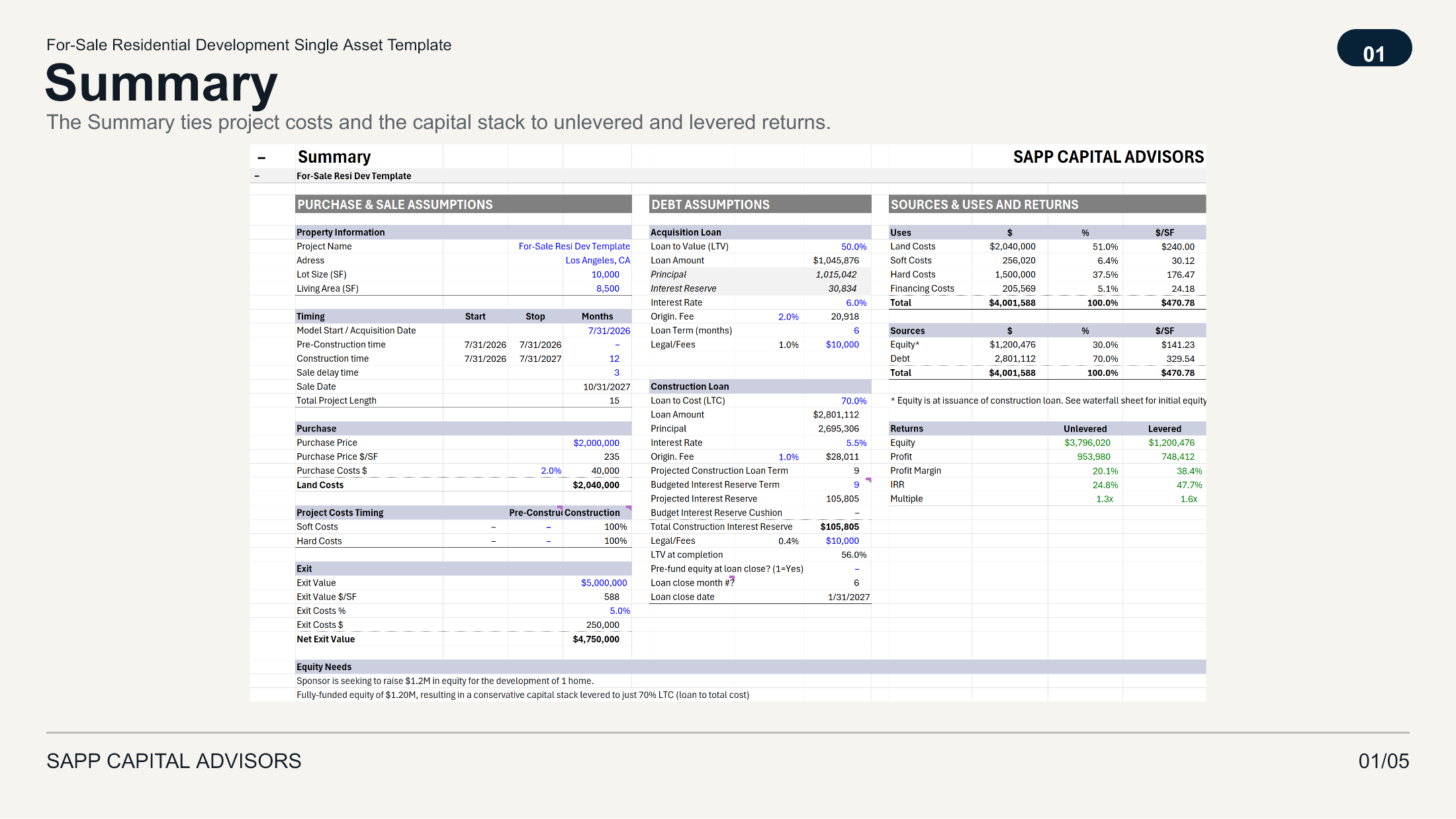
Use this template to underwrite a house, condo, or luxury home development built for sale. The budget, financing, cash flow, and investor returns update from a single set of assumptions.
From Land Purchase to Sale
Start with the property, land purchase price, and project schedule. Set the acquisition date, pre-construction and construction periods (months), expected sale delay time, sale value amount, and its exit costs as well.
These timing assumptions establish the monthly timeline for project costs, loan activity, equity contributions, and the sale.
Build and Time the Development Budget
Set values in the development budget by line item, including land, soft costs, hard costs, contingency, and financing costs. The model shows each category in total dollars and on a per-square-foot basis.
Set how soft and hard costs are allocated between the pre-construction and construction periods. The resulting cost schedule gets reflected directly into the monthly cash flow, where these cost categories are funded with the available equity or debt.
Structure the Capital Stack
The template separates the acquisition loan from the construction loan.
Size the optional acquisition loan using LTV and the construction loan using LTC. The first debt piece to kick in is the acquisition loan which funds the land/site purchase and is repaid with the construction loan proceeds. The model also calculates origination fees, interest expense, interest reserves, and the construction loan draws required to fund the remaining project costs.
The model can fund the remaining construction equity at the construction loan closing or draw it over time as needed. This setting changes the timing of equity contributions throughout the project.
Follow the Monthly Cash Flow
The monthly cash flow connects each project cost to equity contributions, acquisition and construction loan activity, interest, loan balances, sale proceeds, and debt repayment.
This provides a single schedule showing when capital is required and which source funds it.
Evaluate Project and Investor Returns
The Summary presents the project’s sources and uses alongside unlevered and levered IRR, equity multiple, profit, and profit margin.
The Waterfall converts the project-level levered cash flow into sponsor and investor outcomes. Set the Sponsor/GP and Investor/LP contribution shares, preferred returns, hurdle rates, optional catch-up, and distribution splits. The model then calculates the contributions, distributions, IRR, and equity multiple for the investor, sponsor, and overall project.
Built-In Review Controls
The workbook includes checks that flag differences between amounts that should reconcile. A check returning zero means the tested amounts reconcile.
For example:
- The Sources and Uses check confirms that debt and equity equal total project costs.
- The equity check confirms that cash-flow contributions agree with the equity requirement shown on the Summary.
- The loan checks confirm that the acquisition and construction loan balances are fully repaid.
The Change Log lets you save key assumptions and returns as the underwriting assumptions change. Blue font cells identify editable inputs, green font identifies data incoming from other sheets inside the model, and black font identifies fixed formulas. The workbook uses standard Excel formulas without macros.
Best Fit
Use this template for a residential, condominium, or luxury home development that will be sold after construction. It is designed for one project with a defined development period and exit.
It is not intended for projects with rental components.
For cross-template conventions, including color coding, checks, and the Change Log, see Modeling Standards.
Talk through your deal
Book a free 30-minute intro. Underwriting and model review are scoped separately.